AI Control for Ableton Live
Open the StudioPilot setup folder with Claude or Codex (ChatGPT) and let it guide the connection to Ableton. You will need one of those agents to run the setup. A standalone one-click app with the AI built in is also available.
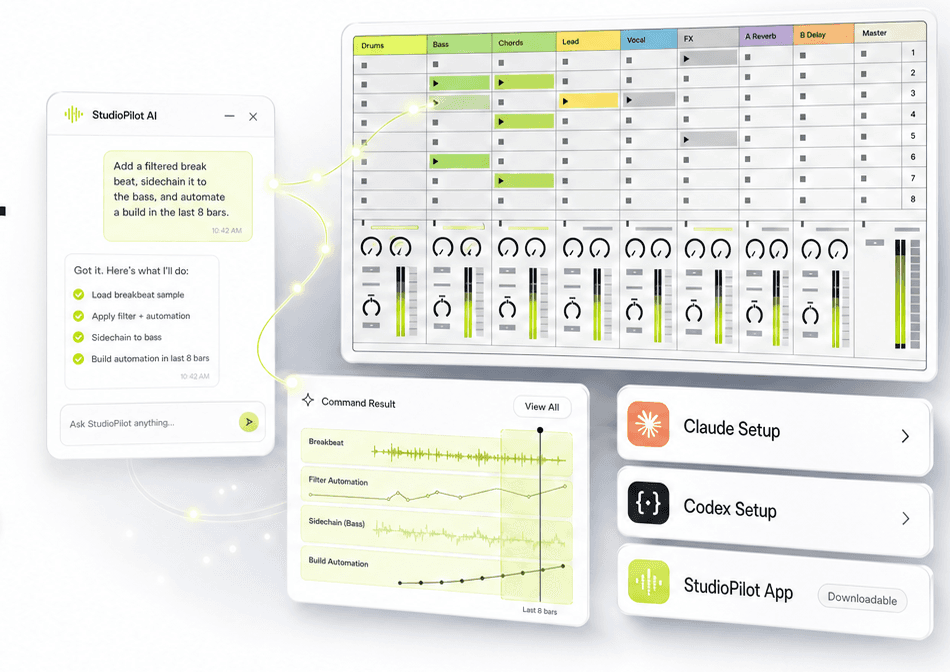
See it in action
Watch a full track built start to finish.
Make ideas faster
Ask for drums, basslines, MIDI clips, scenes, and starting points without clicking through every menu.
Control Ableton
Start playback, set tempo, arm tracks, load sounds, change devices, and edit clips using plain language.
It can see your sound
AI can't hear, so StudioPilot reads the waveform and spectrogram to spot clashes, find the key, and guide your mix and master.
See it in action
Watch a full track built start to finish.
From scanning your own samples to layering without clashes, mixing, and a club-ready master. The whole StudioPilot workflow in one walkthrough.
What it does
It turns plain producer requests into real Ableton actions.
StudioPilot is not a chatbot sitting beside your DAW. It connects to Ableton so the assistant can create clips, control tracks, arrange sections, inspect audio clip data, and move the session forward.
“Make a tight 8-bar house idea, create drums and bass, add a breakdown locator, and clean up the timing.”
The special ingredient
AI can't hear. So StudioPilot lets it see your sound.
The kit ships with a built-in analyser that turns your loops into a waveform and spectrogram the AI can read. It finds what's clashing, what's masking your kick and bass, and where the mids are empty, then scores layers that fill the gaps instead of fighting for the same space.
Band energy and brightness
Reads where each loop lives across the frequency spectrum.
Rhythmic density
Spots busy vs. sparse parts so layers interlock instead of colliding.
Key detection
Detects the key of your audio so new parts stay in tune.
Anti-clash scoring
Ranks your own samples by how well they fill the open pocket.
“Best match: Percussion 10 sits almost entirely in the open mid pocket, at 66% mid, 27% low-mid, zero low and zero high. It can't fight your kick, bass, or hats, and its sparse rhythm interlocks with your busy top loops instead of colliding.”
Producer bottlenecks
The real problem is not making a loop. It is finishing the record.
StudioPilot should speak to the moments where producers actually get stuck: using their own sounds, turning sketches into sections, testing arrangements, and getting to a finished track.
You want to use your own sounds
Most tools generate something generic. Producers need workflows that can load, organise, and build around their own samples, packs, instruments, and Ableton sessions.
Loops are easy. Finishing tracks is hard.
A good 8-bar idea can sit unfinished for weeks because arranging, duplicating, naming, routing, and testing sections breaks the flow.
Testing arrangements takes too long
Trying different structures manually means moving clips, setting markers, changing sections, and undoing half the session.
Technical setup kills momentum
Routing, clip editing, device changes, MIDI cleanup, and session management are useful, but they pull you away from listening.
Choose your option
Set it up with Claude or Codex (ChatGPT).
Works on macOS & Windows
StudioPilot is for music makers first. The setup kit connects Ableton through Claude or Codex (ChatGPT), so you will need one of those agents. Prefer a one-click app with no agent? The standalone app is available now at studiopilotmusic.com/app.
Use Claude
Open the StudioPilot setup folder with Claude and let it guide the computer-side setup, config, and connection test.
Use Codex (ChatGPT)
Open the StudioPilot project in Codex (ChatGPT) and use the included instructions, files, and producer commands to connect Ableton.
Standalone app
A one-click app that needs no Claude or Codex (ChatGPT) — the AI is built in. Available now as a separate app.
See the app →Please note: the setup version requires Claude or Codex (ChatGPT) to work. The standalone one-click app (no agent needed) is available now at studiopilotmusic.com/app. On an older computer that can't run the desktop apps? It still works — there's an alternative setup we show you in a video.
Capabilities
Built around the work producers actually repeat.
Get musical ideas into the session faster
Generate drum patterns, basslines, MIDI clips, scenes, and starting points without building every part manually.
Shape clips without hunting through menus
Clean up timing, humanize velocity, transpose MIDI, adjust clip gain, change audio pitch, and inspect warp markers.
Turn loops into actual song sections
Create locators, jump around the timeline, duplicate clips to arrangement, set loop points, and build structured sections.
Give the AI eyes on your sound
AI can't hear, so StudioPilot reads the waveform and spectrogram of your own loops (band energy, brightness, rhythmic density, and key), then scores layers that fill the empty pockets instead of clashing.
Mix decisions, not just faders
Balance levels, pan for stereo width, send tops and percussion to reverb and delay, high-pass the lows out of your tops, and side-chain the bass under the kick.
Get the track club-ready
Build a master bus with EQ, glue compression, and a limiter, hit a target LUFS, and match the loudness of a reference track. Export your stems, drop them back in, and let StudioPilot analyze and tighten the final file.
Stop scrolling samples. Start finishing tracks.
Get the full StudioPilot Setup Kit: analyser, mix and master workflow, command library, and app, all for a one-time founder price.
Inside the kit
Everything a producer needs to get started.
You get the full masterclass: every feature StudioPilot can do, plus how to set it up and use it, start to finish. Not just the connection, but the whole packaged workflow with videos, templates, and commands.
Social proof
Producers are finishing tracks again.
Real workflows, sped up. Here is what producers say after putting StudioPilot in their sessions.
Swipe to see more →
Hey, I made you 100+ free presets.
I've been deep in Operator and Diva lately and put together two free packs. StudioPilot House, 100 of my best Operator sounds, plus a bonus 30 for Diva. Wobbly Tech Reese and Deep Sub basses, warm Soul Rhodes keys, snappy Tech Plucks and Filter Stabs, plus Lush Pads and Detune Leads. Operator ships with every copy of Live; the Diva pack's yours too if you've got it. Tell me where to send them.
Free forever. We'll only email you the packs and the occasional StudioPilot update. Unsubscribe anytime.
StudioPilot Setup Kit
A premium paid product for producers who want Ableton control from Claude or Codex (ChatGPT) without figuring out the technical setup alone.
Please note: this setup version requires Claude or Codex (ChatGPT) to work. The standalone one-click app is available now.
FAQ
Setup questions, answered in producer language.
The setup is simple: open the setup folder with Claude or Codex (ChatGPT) and it guides the rest. A no-agent standalone app is available now.
How does this connect to my AI agent?
You download the StudioPilot setup folder and open it with Claude or Codex (ChatGPT). The agent can read the instructions, prepare the config, help with the computer-side setup, and guide you through the Ableton steps that still need your approval.
What if I do not use Claude or Codex (ChatGPT)?
The setup kit connects Ableton through Claude or Codex (ChatGPT), so you will need one of them to run it. There is also a separate one-click app with the AI built in (no agent needed), available now at studiopilotmusic.com/app.
My computer can't run the Claude or Codex (ChatGPT) desktop app — can I still use it?
Yes. The desktop apps need a fairly new computer, but StudioPilot still works on older machines using an alternative setup. We've made a step-by-step video that walks you through it — watch the walkthrough above, and if you get stuck, email danny@studiopilotmusic.com and we'll guide you.
What does 200+ Ableton actions mean?
It means the setup can control a wide range of Ableton tasks: playback, tempo, tracks, clips, MIDI notes, audio clip pitch and gain, warp markers, devices, scenes, arrangement, sends, returns, browser loading, recording, and more.
Can I use my own sounds and projects?
That is the point. StudioPilot is positioned around working inside Ableton, with your sessions, sounds, samples, instruments, and arrangement ideas, instead of forcing you into a separate generator.
Can it help me finish tracks?
It should help with the repeated work that slows finishing down: creating sections, testing arrangements, adding locators, duplicating clips, cleaning timing, loading sounds, and making variations while you stay focused on the music.
Does it analyse audio or waveforms?
Yes. This is the core of StudioPilot. The kit includes a built-in audio analyser that reads the waveform and spectrogram of your loops: band energy, brightness, rhythmic density, and key. That is how it finds layers that fill the empty frequency pockets instead of clashing, and how it makes real mix and master decisions. It also reads clip-level data like warp settings, markers, pitch, gain, and Simpler/Sampler info.
How can AI mix if it can't hear?
It can't hear, so StudioPilot lets it see. The analyser turns your audio into a waveform and spectrogram the AI can read, so it can spot what's clashing, what's masking the kick and bass, and where the mids are empty. That's exactly what a producer listens for, shown visually. You still finish with your ears, it just gets you there far faster.
Can it mix and master my track?
Yes. For the mix it balances levels, pans for stereo width, routes sends to reverb and delay, high-passes the lows out of your tops, and side-chains the bass under the kick. For the master it builds a master-bus chain (EQ, glue compression, limiter), targets a LUFS level, and can match the loudness of a reference track. Export your stems, drop them back in, and it analyses and tightens the final file.
Can it detect the key of my samples?
Yes. StudioPilot detects the key of your audio files and can scan your own library to find sounds in a given key, so new parts and basslines stay in tune with what you already have.
Does it work on Windows and Mac?
Yes. StudioPilot works on both macOS and Windows, anywhere Ableton Live and Claude or Codex (ChatGPT) run. The setup steps are the same on either system.
Do I need to code?
No. The product should be packaged as videos, clear setup steps, Ableton templates, ready-made commands, and troubleshooting.
What has to be installed in Ableton?
Ableton needs a small bridge so StudioPilot, Claude, or Codex (ChatGPT) can send actions into Live. The setup folder includes the right files and a guided connection test, but the user may still need to enable the control surface inside Ableton.
What am I paying for?
A finished producer workflow: setup videos, app access, Ableton templates, command packs, troubleshooting, and updates.
Can I use tools I already have?
Yes. If you already use Claude or Codex (ChatGPT), StudioPilot shows you how to connect them. The no-agent standalone app is available now as a separate option.