AI Control for FL Studio
An AI producer that builds your beats, basslines, melodies and chords, designs your sounds, and mixes & masters your track — inside FL Studio. Open the setup folder with Claude or Codex (ChatGPT) and let it guide the connection.
Making music in Ableton Live? Get the Ableton kit instead →
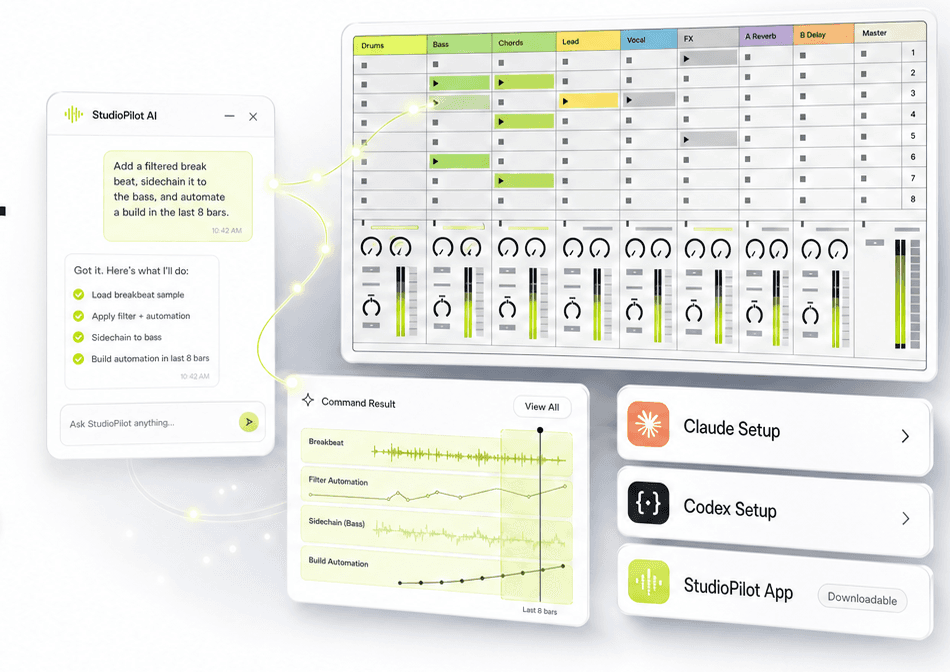
See it in action
Watch a full track built start to finish.
Demo shown in our Ableton version — the FL workflow is the same chat, pointed at FL Studio.
Make beats faster
Ask for boom-bap, trap, house, or four-on-the-floor grooves, basslines, and chord progressions without programming every step.
Control FL Studio
Play, set tempo, program the step sequencer, route channels, and drive your mixer and plugins using plain language.
It knows music theory
Scales in any key and mode, chord progressions by roman numerals, and arpeggios — so every part it writes stays in key.
See it in action
Watch a full track built start to finish.
From first groove to a finished, mixed track — the whole StudioPilot workflow in one walkthrough. Demo shown in our Ableton version; the FL workflow is the same chat, pointed at FL Studio.
What it does
It turns plain producer requests into real FL Studio actions.
StudioPilot is not a chatbot sitting beside your DAW. It connects to FL Studio so the assistant can program patterns, write basslines and chords, design sounds, drive your mixer, and move the track forward.
“Give me a boom-bap beat at 90 BPM, write a bassline in F minor with matching chords, and balance the mix.”
The special ingredient
A producer that actually knows music theory.
StudioPilot FL doesn't guess notes. It works from real scales, chord qualities, and progressions — in any key and mode — and it reads your project before it writes, so every new part fits what's already there.
Scales in every key and mode
Major, minor, dorian, phrygian, lydian, mixolydian, harmonic and melodic minor, pentatonics, and blues.
Chord progressions by numerals
Ask for i–VI–VII in F minor and it voices the actual chords, plus arpeggios in any quality.
Reads before it writes
A full project snapshot — tempo, channels, patterns, effects — so new parts sit in the pocket, in key.
Grid-tight, humanly played
Exact pitch and velocity on the grid, quantize on demand, and polyphonic .mid export for free-form chords.
“Project is 90 BPM. Pattern 1 has kick, snare and hats; pattern 2's bassline sits in F minor. I'll voice the chords as F min, Db maj, Eb maj above the bass, and keep the hats' velocity groove.”
Producer bottlenecks
The real problem is not making a loop. It is finishing the record.
StudioPilot speaks to the moments where producers actually get stuck: using their own sounds, writing the parts a loop is missing, dialing the mix, and getting to a finished track.
You want to use your own sounds
Most tools generate something generic. Producers need workflows that build around their own FL Studio projects, instruments, and sounds.
Loops are easy. Finished tracks are hard.
A good 8-bar idea can sit unfinished for weeks because writing the bassline, the chords, the variations, and the mix breaks the flow.
Tweaking knobs kills the vibe
Hunting for the right parameter across plugin windows — cutoff here, resonance there — pulls you out of listening mode.
Technical setup kills momentum
Routing channels to the mixer, naming tracks, setting sends, and managing patterns are useful, but they pull you away from the music.
Choose your option
Set it up with Claude or Codex (ChatGPT).
Works on Windows & macOS
StudioPilot is for music makers first. The FL kit connects FL Studio through Claude or Codex (ChatGPT), so you will need one of those agents. Our standalone one-click app currently supports Ableton — FL support is on the roadmap.
Use Claude
Open the StudioPilot FL setup folder with Claude and let it guide the computer-side setup, config, and connection test.
Use Codex (ChatGPT)
Open the StudioPilot FL project in Codex (ChatGPT) and use the included instructions, files, and producer commands to connect FL Studio.
Please note: the FL kit requires Claude or Codex (ChatGPT) to work. And one honest FL limit — it builds, designs, mixes and masters, but FL's API doesn't allow placing clips on the playlist, so you arrange the timeline yourself.
Capabilities
Built around the work producers actually repeat.
Get musical ideas into the project faster
Program step patterns and instant grooves, write basslines and melodies with exact pitch and velocity, and build chord progressions and arpeggios in any key.
Shape your sounds without menu-diving
Control any loaded plugin's parameters by name — cutoff, resonance, whatever it exposes — and flip through presets until it sits right.
Every part in key, every time
Scales in any key and mode — major, minor, dorian, phrygian, pentatonic, blues and more — quantized to the grid, plus polyphonic .mid export for free-form chords.
It can see your whole project
StudioPilot reads a full snapshot of your session — tempo, tracks, channels, patterns, and every loaded effect — and reads back the notes in a pattern, so its next move fits what's already there.
Mix decisions, not just faders
Balance levels and pans across 18+ mixer tracks, shape each track with 3-band EQ, set sends and routing, control your compressors and reverbs by name, and watch peak levels while you go.
Get the track release-ready
Control your master chain — volume, EQ, and your limiter or maximizer by parameter name — while reading master peaks for loudness and headroom.
Stop programming steps. Start finishing tracks.
Get the full StudioPilot FL Kit: beats, basslines and chords, sound design, the mix and master workflow, and the command library — all for a one-time founder price.
Inside the kit
Everything a producer needs to get started.
You get the full masterclass: every feature StudioPilot FL can do, plus how to set it up and use it, start to finish. Not just the connection, but the whole packaged workflow with videos, a template project, and commands.
StudioPilot FL Kit
A premium paid product for producers who want FL Studio control from Claude or Codex (ChatGPT) without figuring out the technical setup alone.
Please note: the FL kit requires Claude or Codex (ChatGPT) to work, and you arrange the playlist yourself (FL's API doesn't allow clip placement).
FAQ
Setup questions, answered in producer language.
The setup is simple: open the FL setup folder with Claude or Codex (ChatGPT) and it guides the rest.
How does this connect to my AI agent?
You download the StudioPilot FL setup folder and open it with Claude or Codex (ChatGPT). The agent reads the instructions, prepares the config, helps with the computer-side setup, and guides you through the FL Studio steps that still need your approval.
What if I do not use Claude or Codex (ChatGPT)?
The FL kit connects FL Studio through Claude or Codex (ChatGPT), so you will need one of them to run it. Our standalone one-click app currently supports Ableton Live — FL support in the app is on the roadmap.
Does it arrange my track on the timeline?
Not in FL — and we want to be upfront about it. FL Studio's scripting API doesn't allow placing clips in the playlist, so StudioPilot FL builds your patterns, writes your parts, designs sounds, and mixes and masters, and it can drop section markers (Intro, Drop, Breakdown) — but you place the clips in the playlist yourself. If full timeline arrangement matters most to you, our Ableton version does it.
What does 60+ FL Studio actions mean?
It means the setup can control a wide range of FL Studio tasks: playback, tempo, the step sequencer, channel rack, patterns, 18+ mixer tracks, per-track EQ, effects and plugin parameters, the master chain, markers, and reading a full snapshot of your project.
Can I use my own sounds and projects?
Yes — StudioPilot works inside your own FL Studio project with whatever you have loaded. One FL platform limit to know: the API can't load new plugins or samples by itself, so the kit ships a template project with sounds pre-loaded, and you drop your own instruments and samples in as usual — the AI then sequences, designs, and mixes them.
Can it help me finish tracks?
It handles the repeated work that slows finishing down: programming grooves, writing basslines and chords in key, dialing in sounds, balancing the mix, and setting up the master — so you stay focused on the music and the arrangement.
Can it mix and master my track?
Yes. For the mix it balances levels and pans across the mixer, shapes tracks with 3-band EQ, sets sends and routing, and controls your compressors, reverbs, and delays by name. For the master it drives your master-chain plugins — limiter or maximizer settings by parameter name — while reading master peaks for loudness and headroom.
How does it know what's in my project?
StudioPilot reads a live snapshot of your session — tempo, tracks, channels, patterns, and every loaded effect — and can read back the notes in any pattern. That's how what it writes and mixes fits what's already there.
Does it work on Windows and Mac?
Yes. StudioPilot FL works on both Windows and macOS, anywhere FL Studio and Claude or Codex (ChatGPT) run. The setup steps are the same on either system.
Do I need to code?
No. The kit is packaged as videos, clear setup steps, an FL template project, ready-made commands, and troubleshooting.
What has to be installed in FL Studio?
FL Studio needs a small bridge script so StudioPilot, Claude, or Codex (ChatGPT) can send actions into it. The setup folder includes the right files and a guided connection test — you enable the script once in FL's MIDI settings.
What am I paying for?
A finished producer workflow: setup videos, the FL template project, command packs, troubleshooting, and updates. One payment, no subscription.